WPGraphQL Smart Cache Optimization on WP Engine Managed Hosting
This guide covers WPGraphQL Smart Cache as it relates to leveraging network caching on WP Engine’s Managed Hosting for WordPress.
This guide assumes familiarity with:
- The basic concepts of tag-based cache invalidation, persisted queries, and network caching (see the WPGraphQL Smart Cache announcement post)
Cache-Controlheaders and HTTP Caching
Prerequisites
Section titled “Prerequisites”- A WordPress site hosted on WP Engine
- WPGraphQL plugin installed and activated
- WPGraphQL Smart Cache plugin installed and activated
- A GraphQL client configured to use GET requests (required for network caching)
- (Optional) Advanced Network or Global Edge Security (GES) with EFPC enabled for CDN-level caching
Enable and disable network caching
Section titled “Enable and disable network caching”To enable network caching, change your GraphQL client from using POST requests to GET requests. This is the only required step other than installing WPGraphQL Smart Cache.
To disable caching for specific queries, switch those specific requests back to HTTP POST requests. This assumes you’re not using Smart Cache’s object caching feature.
Cache layers on WP Engine
Section titled “Cache layers on WP Engine”On the WP Engine platform, all requests go through a minimum of two layers of caching + the browser cache. However, events from WordPress, via Smart Cache, purge only one of these caches.
Client Cache
Section titled “Client Cache”This could be the user’s browser or your headless application server. Whatever the source, these caches usually operate independently of Smart Cache and thus solely rely on the TTL and cache-control headers to determine caching.
CDN Cache
Section titled “CDN Cache”The next possible cache is WP Engine’s Advanced Network (AN), powered by Cloudflare. By default, this will not cache GraphQL responses. Cloudflare considers HTML and JSON responses dynamic, and thus uncacheable, without additional configuration. To resolve this, WP Engine recently introduced the Edge Full Page Cache (EFPC) – a feature of AN that enables caching HTML and JSON responses.
Enabling EFPC means our GraphQL responses are now being cached on the edge. However, EFPC does not cache based on keys and is not purged by Smart Cache. It must rely on the configured TTL.
Anywhere you read Advanced Network (AN) in this guide, you can substitute Global Edge Security (GES) if you’re using that product instead. EFPC is available on both AN and GES.
Server Cache
Section titled “Server Cache”Third, all WP Engine WordPress sites have a Varnish server cache. Varnish is the only place (other than the object cache) where Smart Cache purges data. Varnish also uses the configured TTL as a fallback.
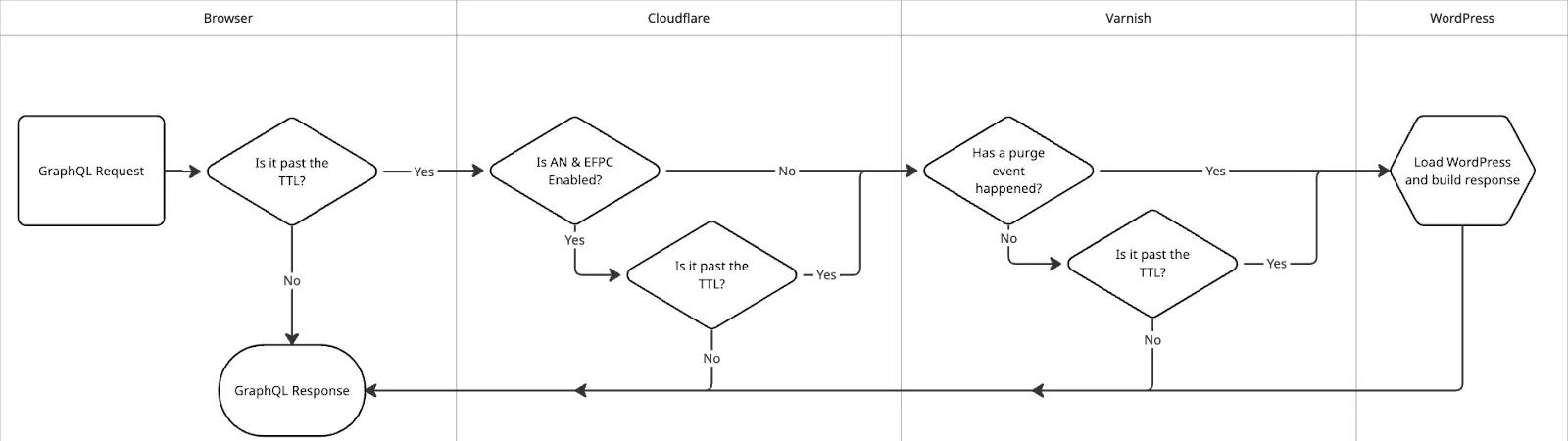
These are the only caches on the WordPress side. Your headless application may have its own GraphQL cache, and pages can also be cached by frameworks or ISPs based on the Cache-Control header. All downstream caches rely on the configured TTL.
The following table summarizes how each cache layer handles GraphQL responses:
| Cache | Caches GraphQL responses | TTL Config | Tag-based cache invalidation | Time-based cache invalidation |
|---|---|---|---|---|
| Browser | YES | Cache-Control | NO | YES |
| Advanced Network | CONFIGURABLE | Cache-Control, CDN-Cache-Control | NO | YES |
| Varnish | YES | Cache-Control | YES | YES |
Default behavior (without EFPC)
Section titled “Default behavior (without EFPC)”With a site on WP Engine, a correctly configured GraphQL client, and default Smart Cache settings, the three caching layers are the browser, Cloudflare, and Varnish.
Request flow
Section titled “Request flow”The table columns show the cache status header returned at each layer:
| Layer | First request ever from Visitor A | Nth response from Visitor B |
|---|---|---|
| Browser | MISS | MISS |
| Cloudflare | DYNAMIC | DYNAMIC |
| Varnish | MISS | HIT: N |
| Server | Responds | – |
Neither visitor has a browser cache, so the request passes to Cloudflare. Cloudflare responds with DYNAMIC because JSON is considered uncacheable content (EFPC is not enabled). The first request misses Varnish and the server responds. Visitor B’s request hits the Varnish cache.
By default, Varnish caches the response for 600 seconds (10 minutes) or until a tag-based purge event occurs, whichever comes first. The Smart Cache TTL setting adjusts this value.
Subsequent requests within the TTL window are served from the browser cache. After expiry, the cycle restarts. New visitors continue to receive Varnish cache hits until the next invalidation.
Limitations and workarounds
Section titled “Limitations and workarounds”Varnish response times are roughly an order of magnitude faster than the server (~2s => ~200ms). However, the browser and Varnish share the same TTL by default. This means the browser cache continues serving stale data for 600s even after Smart Cache invalidates data in Varnish via a purge event.
Key behaviors of the default config:
- WP Engine’s Varnish does not allow TTLs lower than 600s (higher values are respected).
- Setting a Smart Cache TTL to 60s results in a 60s browser cache but Varnish still uses 600s — quick navigations use browser cache, while subsequent requests get fresh data from Varnish.
- Smart Cache sets headers as
max-age={TTL}, s-maxage={TTL}, must-revalidate. There is no UI option to sets-maxageindependently. - The
graphql_response_headers_to_sendfilter can override these headers from PHP.
Separate browser and Varnish TTLs with Web Rules
Section titled “Separate browser and Varnish TTLs with Web Rules”WP Engine Web Rules can add or modify headers after Varnish. This allows setting a Cache-Control header that affects Cloudflare and the browser without changing Varnish behavior.
- In the WP Engine User Portal, navigate to Web Rules for your environment.
- Create a new rule with a condition matching the GraphQL endpoint path (e.g.,
/graphql). - Set the action to “Set Response Header”.
- Set the header name to
Cache-Controland the value to your desired directive (e.g.,max-age=300, s-maxage=700, public, stage-while-revalidate=60). - Save and deploy the rule.
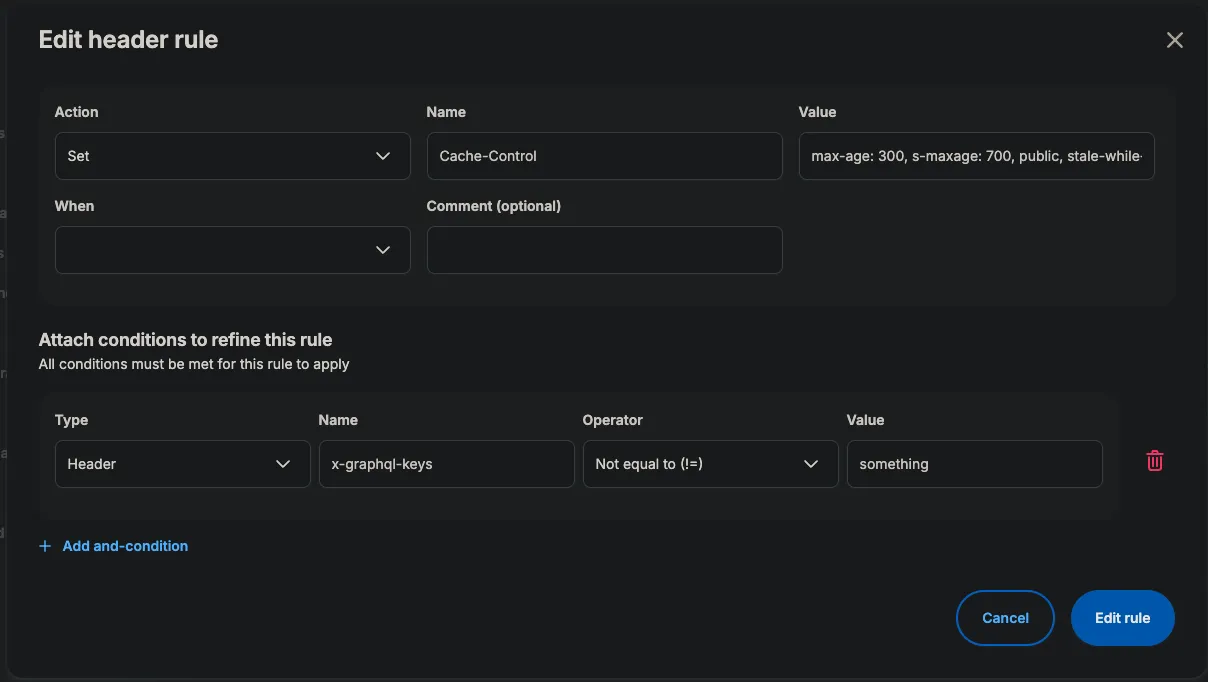
Smart Cache settings now only affect Varnish TTLs, so Varnish TTLs can be raised while browser/CDN TTLs are lowered — resulting in higher hit rates and fewer stale responses.
The different headers Smart Cache sets (e.g., X-GraphQL-Query-ID) can also be used in Web Rules conditions to configure different cache control values by post type, query, or other criteria.
Behavior with EFPC enabled
Section titled “Behavior with EFPC enabled”With EFPC enabled and the same configuration as above, Cloudflare begins caching JSON responses.
Request flow
Section titled “Request flow”| Layer | First request ever from Visitor A | Nth response from Visitor B |
|---|---|---|
| Browser | MISS | MISS |
| Cloudflare | MISS | HIT |
| Varnish | MISS | HIT: N |
| Server | Responds | – |
Now that Cloudflare knows how to cache JSON with EFPC, responses will start receiving HIT status. EFPC fully relies on TTLs to invalidate data. Once the data goes stale, Cloudflare requests a fresh response from the server stack, where Varnish can respond.
After the TTL expires, Cloudflare returns a stale response and revalidates against the origin, where Varnish responds with a HIT. The request only reaches the WordPress server once Varnish itself receives a purge event or its TTL expires. Additional Cloudflare points of presence are also primed with data from the Varnish cache.
TTL configuration with EFPC
Section titled “TTL configuration with EFPC”EFPC reduces latency by roughly another order of magnitude (~200ms => ~20ms). With this config, the browser and Cloudflare can be controlled separately using max-age and s-maxage respectively.
To target Cloudflare independently from other downstream shared caches, use the CDN-Cache-Control header. See the Cloudflare CDN-Cache-Control docs for details.
Recommended configuration
Section titled “Recommended configuration”For most headless WordPress sites on WP Engine, the following configuration provides a good balance of freshness and performance:
| Setting | Value | Reason |
|---|---|---|
| Smart Cache TTL | 900s (15 min) or higher | Maximizes Varnish hit rate |
Web Rule max-age | 60s | Limits stale browser cache after purge events |
Web Rule s-maxage | 600s | Allows shared caches (Cloudflare) longer TTL |
| EFPC | Enabled | Adds edge caching for much improved response times |
Platform-specific caching behavior
Section titled “Platform-specific caching behavior”The following are known behaviors and quirks of caching on the WP Engine platform with Smart Cache.
Varnish
Section titled “Varnish”- Purged by events or TTL, whichever comes first.
Cache-Controlheaders from WordPress are moved tox-orig-cache-controland overridden by Varnish.- Sending requests with
x-wpe-no-cache: truegenerally disables the Varnish cache, but does not affect AN/EFPC. Varnish ignoresCache-Control: no-cacherequest directives. - Varnish resets TTLs from Smart Cache below 600s to 600s. TTLs over 600 are respected by Varnish.
- Regardless of the configured TTL, the response header is modified to
max-age: {ttl}, must-revalidate; all other directives are stripped. - Web Rules modify headers after Varnish. The cache control headers you set in Web Rules do not change Varnish behavior.
- POST requests are never cached.
- Editing a page configured as the WordPress “Home” page purges the entire domain in Varnish.
- Not purged by events — only invalidated by TTL expiry.
Cache-Control,CDN-Cache-Control, andCloudflare-CDN-Cache-Controlheaders can all configure EFPC behavior. Cloudflare uses only the most specific header, not a combination.- Cloudflare ignores
Cache-Control: no-cacherequest directives. - POST requests are never cached.
Next steps
Section titled “Next steps”For additional help with caching configuration, contact WP Engine support or join the Headless Discord.